
Since the iPad Pro’s release I was determined to work it into my daily life where my other iPad had never secured a place – I wanted to record guitar, write, and also use it for my 9-5 job. In doing this I found some shortfalls, including the ability to share from GarageBand.
How to share from GarageBand to Google Drive
Garageband is a free (to all new iOS customers) app and covers a lot of bases for you as a creative — be it recording guitar or any other audio on iPhone or iPad.
Google Drive is free and gives you 15GB of online storage out of the box.
Once you have your creation ready and you’re signed into the Google Drive app, just follow these steps to share from GarageBand:
- Launch GarageBand on your iPhone or iPad.
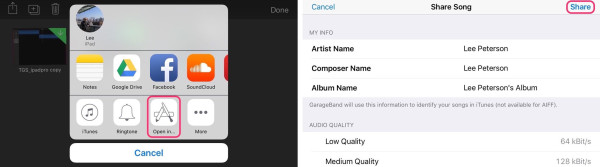
- Once you are at the My Songs page, tap on Select and choose your song.
- In the second row of icons, tap on Open In….
- Check out all your details and change anything you need to, then tap Share at the top right.
- Now choose Google Drive.
- Here you can fill in any details, change where you want the file in Drive, and toggle between Google Drive accounts (if you’re signed in to more than one). Once you’re done, tap on Upload.
Note: If you don’t see Google Drive in the share section, you may need to activate the extension by scrolling all the way to the right and tapping More and toggling On the Google Drive option.


If you’ve found other ways to share from Garageband that work well, I’d be interested to know what they are, so let me know in the comments!


It does not work, because it never finishes the upload. I think Apple hinders that (maybe only in Germany?)
Have you heard anything more on this? I am also in Germany and about 6 months ago project files could be uploaded to drive, but now as you say the upload doesn’t finish. Mp4s go file from GB to Drive, but not project file. Anyone have a work around?
Works,thanks!
once you share what does the other person have to do in order to open the shared file (macbook)? having trouble with this right now, any help would be great thanks
Exactly, how do you open it now!