
3D Touch has been a game changing feature in the functionality that it offers, and I still try and find a use case for it all the time. iOS 10 has brought many new features to phones with 3D Touch, and the tip I’ll show you today will save you lots of time.
iOS 10 has lots of different ways to clean up your phone from distractions. If you’ve ever wanted to get rid of all of your notifications in one quick gesture, you’re in luck. Here’s how to use the new functionality.
How to dismiss all notifications using 3D Touch
- Launch Notification Center by swiping down from the top of your screen
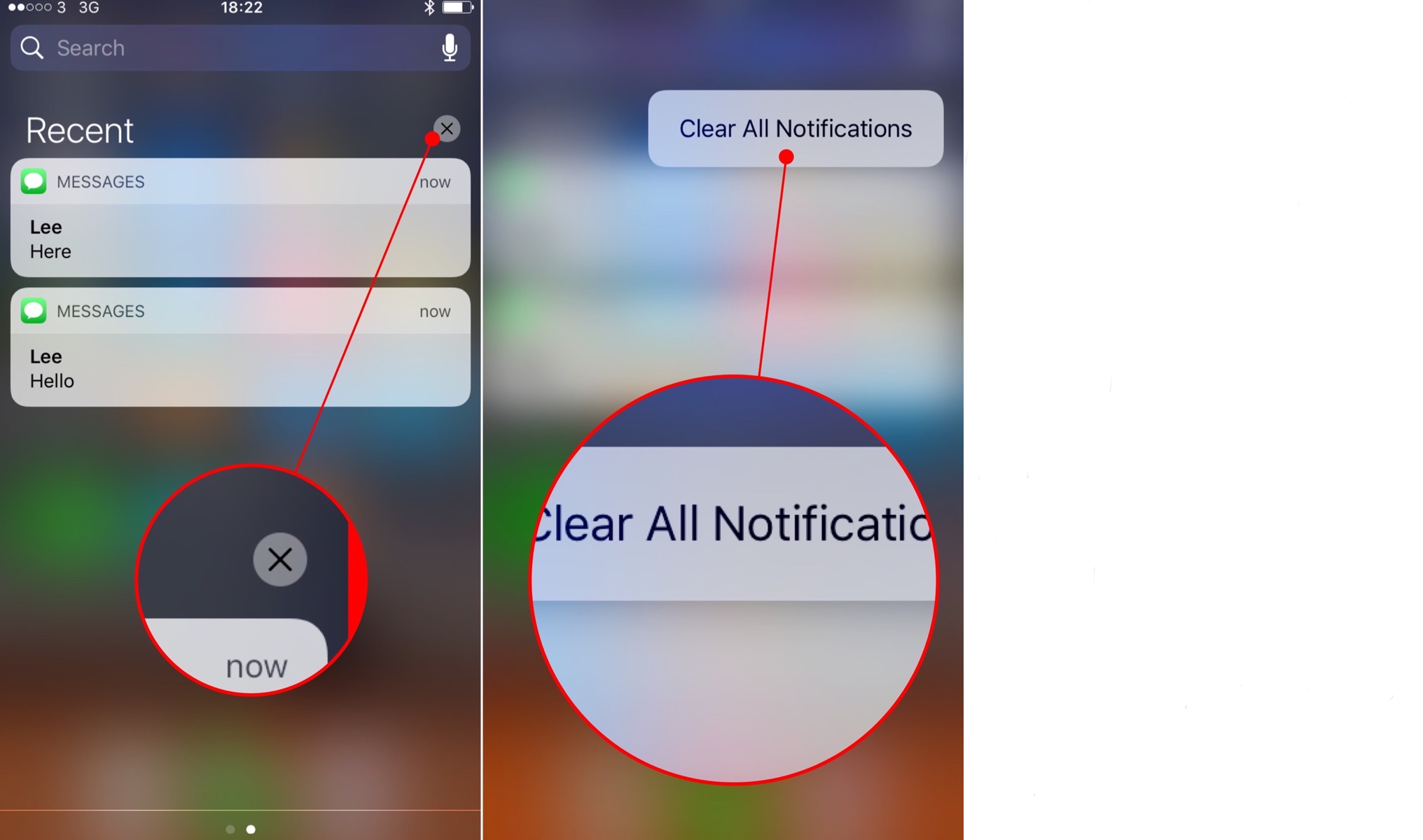
- You’ll now see all of your notifications. Simply 3D Touch the X above the notifications
- Tap Clear all notifications
What’s your favorite 3D Touch gesture?
This tip is one of the handiest features of iOS 10, and is a big time saver. What is your favorite 3D Touch gesture?


Leave a Reply