
Apple’s Music Memos can be the difference between remembering that next great song, or having it be lost to the ether. When Apple surprised iOS users with Music Memos, I initially thought of all the great advancements to the Notes app and was extremely happy they were giving some more love to musicians.
With Music Memos, musicians, hobbyists, and more all have a great place to record ideas. What makes the app so powerful is that it allows you to capture an idea virtually anywhere you can bring your phone, and is oftentimes better than writing it down, because you can hear the nuances of how you played the notes.
The big difference between Voice Memos and Music Memos, is that the Music version doesn’t compress your audio, and you can hear what you played in pristine quality (as great as the mic and rest of the phone’s components can be). So far I’ve tested the app with piano and guitar (Apple has said it can be used with other instruments), and it really works.
In this post, I’d like to show you why this app can be such an invaluable tool.
Simplicity & Quickness
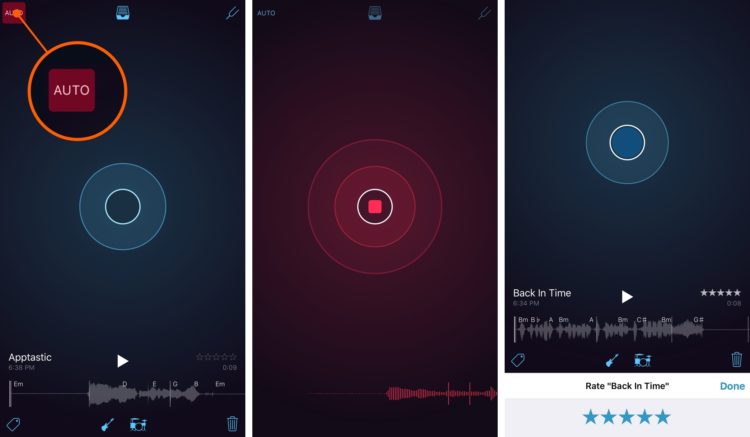
When you open Music Memos you’re greeted with a blue record button smack-dab in the middle of the screen. There are two ways to go about recording your ideas. The first way is by simply pressing the button in the middle of the screen, but Apple has also incorporated a musician friendly option in the upper left of the screen called Auto record. With Auto record turned on, Music Memos will start recording as soon as it hears you start playing music. This is very helpful so you don’t have to fiddle with your iPhone, and it lets you focus on playing right away.
Once you have your song or riff down you can continue working on it, including adding tags and star ratings for each idea. If you’d rather leave it be for the time being, Music Memos syncs up with iCloud so your ideas are available on all of your devices.
Rhythm Section in Your Pocket
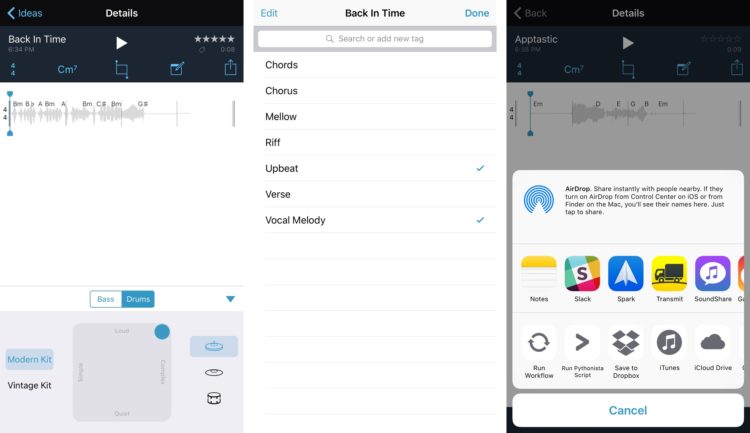
If you do decide to keep going, Apple has included a bassist and drummer right within the app! They determine what rhythm was played, and what chords were played and it usually works most of the time.
You can adjust what type of bass player (electric or upright) and what type of drum kit you’d like to use (vintage or modern). You can also change how the parts are played. They can be fancy and more complex or more straight ahead and simple. To bring up this functionality, long press on either the bass or drum kit icon.
In the editor you can name and edit your idea, change the time signature, and fix any chords that the app may have got wrong. If you had any notes or lyrics you’d like to write down, there’s a notes section and a place to note what tuning you used if you were playing guitar.
Going Beyond the App
While Music Memos is a great starting place for ideas, sometimes those demo tracks can be fleshed out into full on arrangements.
You can share your song on YouTube, Soundcloud, and elsewhere on the share sheet. If you want to try an all in one solution, the tracks can be imported into GarageBand right on your phone, where they can be split out for further recording and mixing. This is also a really easy way to start writing a song with friends, as you can share parts back and forth through e-mail or cloud services like DropBox.
Let’s Hear Your Music Memos Song!
We’d love to hear what you’re doing with the Music Memos app. Post a link in the comments below, so we can hear your latest creations!
- Free – Download


